

Electricity consumers across Pakistan are increasingly using QR-based tools to simplify access to online utility services. One of the most useful solutions is the LESCO QR Code Scanner, which allows users to quickly open official electricity-related portals without manually typing long reference numbers. Whether you want to check Cross Subsidy Program eligibility, verify billing information, or access PITC services, QR code scanning provides a faster and more convenient experience.
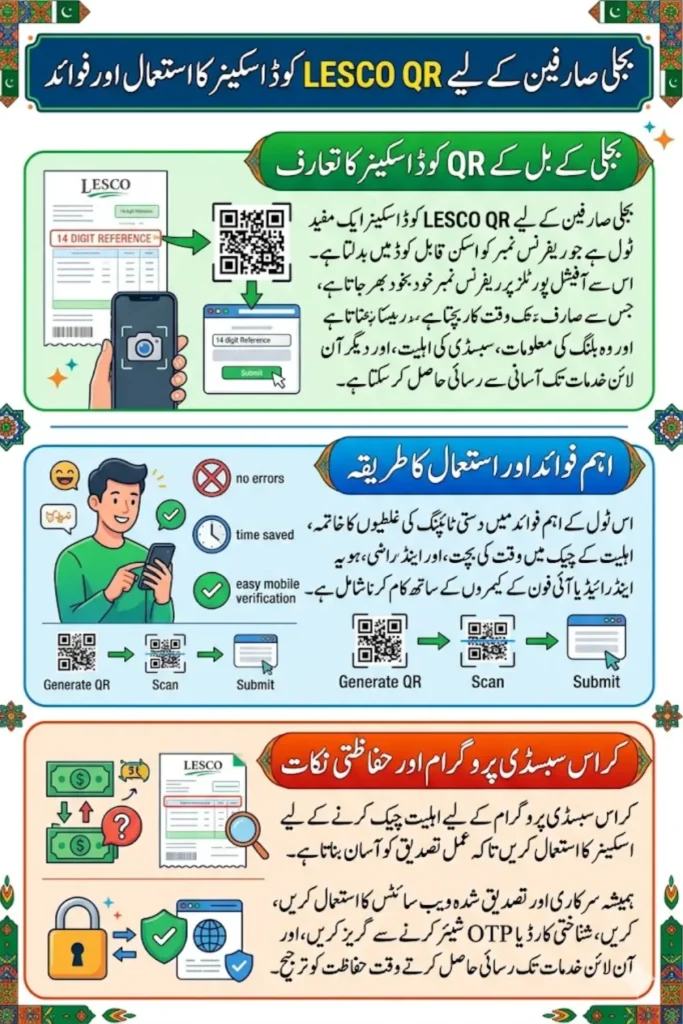
Many users face difficulties entering 14-digit electricity reference numbers correctly, especially on mobile devices. A QR code scanner eliminates typing errors by automatically opening the correct URL with the reference number already included. Understanding how LESCO reference numbers work and how different DISCOs format their numbers can help consumers avoid mistakes and complete verification processes successfully.
What Is the LESCO QR Code Scanner?
The LESCO QR Code Scanner is a tool that converts an electricity bill reference number into a scannable QR code. When scanned using a smartphone camera, the QR code opens the relevant official portal, such as the PITC Cross Subsidy Program eligibility page, with the reference number already pre-filled.
You can also read: BISP 8171 Double Payment Announced
This simple process saves time and reduces the risk of entering incorrect digits. Instead of manually typing a long reference number, users can scan the QR code and continue the verification process directly from their mobile phones.
Key Benefits of Using a QR Code Scanner
The QR code method offers several advantages for electricity consumers:
- Eliminates manual typing errors
- Saves time during eligibility checks
- Works with Android and iPhone cameras
- Makes desktop-to-mobile transitions easier
- Provides direct access to official PITC services
- Requires no additional mobile applications
For users completing CNIC and OTP verification on mobile devices, QR scanning creates a much smoother experience.
How the LESCO QR Code Scanner Works
The scanner generates a QR code containing a direct URL that includes the consumer’s electricity reference number. Once scanned, the smartphone opens the official webpage and automatically fills the reference number field.
For example, the QR code may contain a link similar to:
Because the reference number is embedded in the URL, users do not need to enter it again on the PITC website.
Step-by-Step Process
Follow these simple steps to use the scanner:
- Open the QR code generator page.
- Enter your electricity reference number.
- Wait for the QR code to generate.
- Open your smartphone camera.
- Scan the displayed QR code.
- Tap the notification that appears.
- The official PITC page opens automatically.
- Submit the form to check eligibility.
The entire process typically takes less than a minute.
Where to Find Your LESCO Reference Number
The reference number is printed on every electricity bill issued by LESCO and other Pakistani distribution companies. It is usually located near the customer name, address, and billing information section.
Depending on the bill format, the number may appear under labels such as “Reference No.”, “Consumer Number”, or “Account Number”. Users should enter only digits and remove any spaces, dashes, or separators before using QR tools.
Common Locations on a Bill
You can usually find the number in:
- Top section of the printed bill
- Online bill PDF copies
- Official DISCO mobile applications
- Consumer account dashboards
- Previous payment confirmation messages
Always verify the number carefully before generating a QR code.
You can also read: Magnificent Tourism Internship Program
DISCO-Specific Reference Number Formats
Different electricity distribution companies use slightly different reference number structures. Although most modern systems use 14-digit numbers, some legacy billing systems may use shorter formats.
| DISCO | Standard Reference Number Length |
|---|---|
| LESCO | 14 Digits |
| MEPCO | 14 Digits |
| IESCO | 14 Digits |
| FESCO | 14 Digits |
| GEPCO | 14 Digits |
| PESCO | 14 Digits |
| HESCO | 14 Digits |
| SEPCO | 14 Digits |
| QESCO | 14 Digits |
| HAZECO | 14 Digits |
| TESCO | 10–14 Digits |
Consumers should enter the complete reference number exactly as it appears on their electricity bill.
Understanding LESCO Reference Number Structure
A LESCO reference number acts as a unique identifier for a specific electricity connection. It allows the billing system to retrieve consumer information, meter details, billing history, and subsidy eligibility records.
Although consumers do not need to understand every section of the number, it is important not to omit leading zeros or remove any digits. Even a single incorrect digit can result in eligibility check failures or bill lookup errors.
Common Mistakes to Avoid
Many consumers encounter issues because of small data-entry mistakes.
Avoid these common errors:
- Skipping leading zeros
- Entering spaces between digits
- Using old inactive reference numbers
- Confusing account numbers with reference numbers
- Copying numbers from outdated bills
- Including dashes or special characters
Careful entry significantly improves verification success rates.
Using QR Codes for Cross Subsidy Program Checks
The Government of Pakistan’s Cross Subsidy Program helps eligible low-income domestic consumers receive protected electricity tariffs. PITC manages the verification process for participating DISCOs nationwide.
Using a QR code scanner simplifies access to the eligibility portal by automatically passing the reference number into the official system. Once eligibility is confirmed, consumers can continue with CNIC and OTP verification to complete registration.
Eligibility Requirements Generally Include
Most applicants must meet the following conditions:
- Domestic electricity connection
- Protected consumer category eligibility
- Acceptable six-month consumption average
- Active electricity meter
- One eligible connection per household CNIC
- Valid mobile number for OTP verification
Eligibility rules may change according to government policy updates and NEPRA tariff decisions.
You can also read: Market Timing Notification June 2026
Why QR Scanning Is Better Than Manual Entry
Manual entry of long electricity reference numbers often leads to typing mistakes, especially when users switch between devices. QR scanning eliminates this problem by transferring information automatically.
It also improves convenience for users who begin the process on a desktop computer but want to complete verification on their personal smartphone. This makes QR technology particularly useful for subsidy registrations and electricity-related online services.
Major Advantages
Users benefit from:
- Faster processing
- Higher accuracy
- Better user experience
- Reduced form-entry mistakes
- Easy mobile verification
- No software installation requirements
These advantages help consumers complete registrations more efficiently.
Troubleshooting QR Code Scanner Issues
Most QR code scanning problems can be resolved quickly. Poor screen brightness, camera focus issues, or internet connectivity problems are usually the main causes.
If a QR code does not scan immediately, increase screen brightness, clean the phone camera lens, and hold the device steady for a few seconds. Modern smartphone cameras generally recognize QR codes automatically.
Solutions for Common Problems
If you experience difficulties, try the following:
- Increase display brightness
- Zoom in on the QR code
- Move closer to the screen
- Use Google Lens if available
- Refresh the page and regenerate the QR code
- Verify the reference number format
These simple fixes solve most scanning issues.
Security and Privacy Considerations
Consumers often worry about whether QR code tools store personal information. Reputable QR generators generally only create a QR image that contains the destination URL. The actual verification process takes place on the official PITC portal.
Users should always confirm that the final destination URL belongs to an official government or utility platform before entering sensitive information such as CNIC numbers or OTP codes.
Best Security Practices
For maximum safety:
- Verify the destination website domain
- Use official PITC and DISCO services
- Avoid sharing OTP codes
- Never enter CNIC details on unknown websites
- Check for HTTPS secure connections
- Use personal devices whenever possible
Following these precautions helps protect personal information.
You can also read: Lesco Bill QR Code Scanner Details
Latest Updates for LESCO and Other DISCO Consumers
Digital utility services continue to expand across Pakistan. QR-based access methods are becoming more common because they simplify consumer interactions with billing systems, subsidy programs, and online verification portals.
As government digital initiatives grow, consumers can expect additional QR-enabled services, faster verification methods, and improved integration between DISCO systems and PITC platforms. Staying informed about official updates ensures that users can take full advantage of available benefits and services.
Conclusion
The LESCO QR Code Scanner provides a quick, accurate, and user-friendly way to access official electricity services without manually entering long reference numbers. By generating a scannable QR code linked to the correct reference number, consumers can check eligibility, verify information, and complete registration processes more efficiently.
Understanding DISCO-specific reference number formats is equally important because even minor mistakes can prevent successful verification. Whether you are a LESCO, MEPCO, FESCO, IESCO, or PESCO consumer, using QR-based tools and entering the correct reference number can save time, reduce errors, and simplify access to important electricity services.