
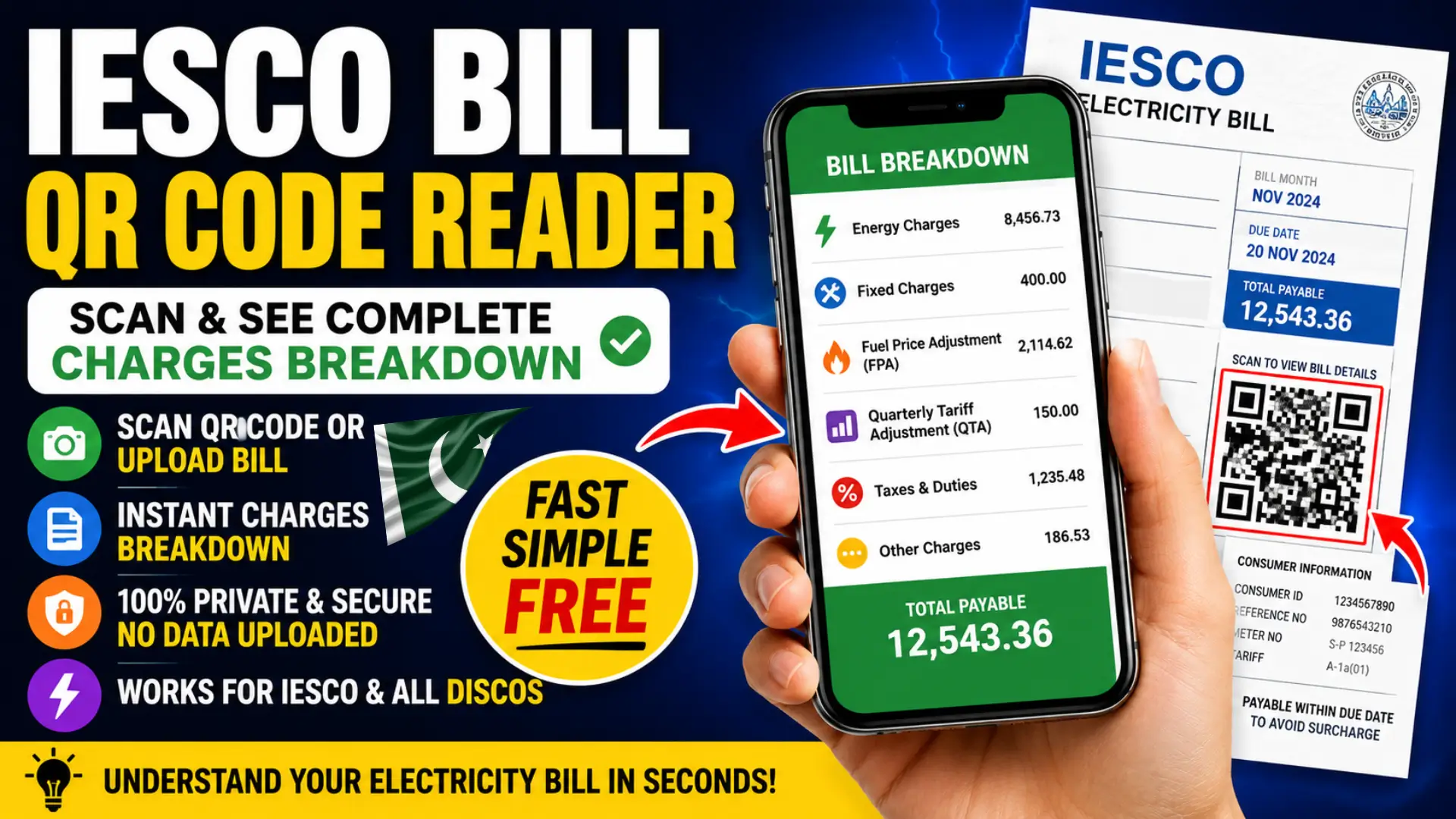
Understanding your electricity bill should not be difficult. Every modern IESCO electricity bill includes a QR code that stores a detailed breakdown of your monthly charges. Instead of trying to read small printed figures or guessing what each amount means, you can simply scan the QR code to instantly view every charge in a clear and organized format.
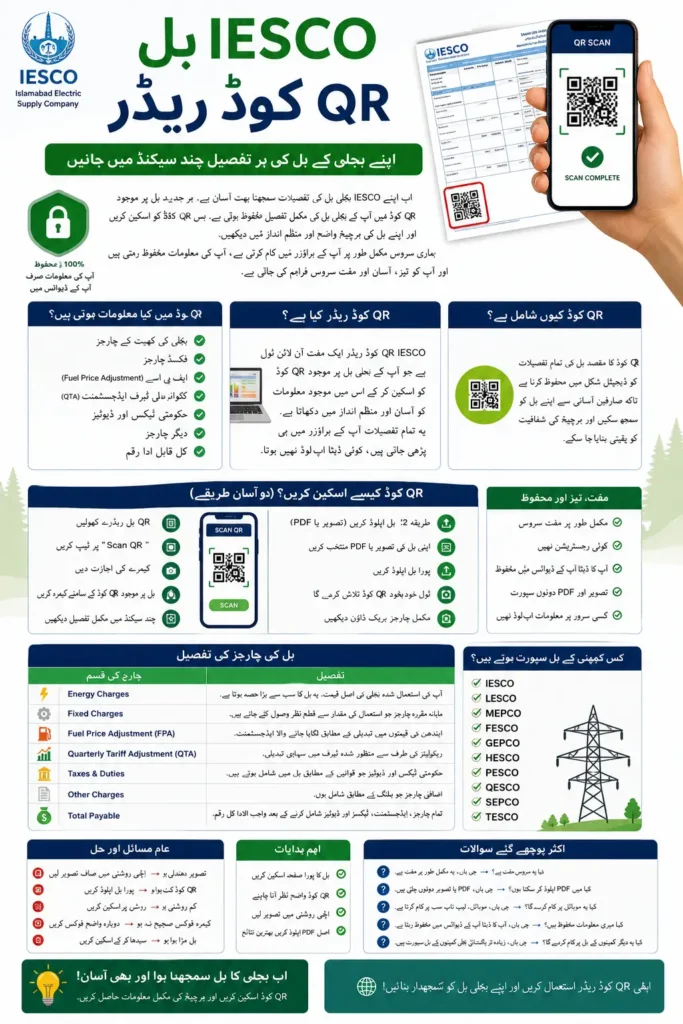
The best part is that modern IESCO Bill QR Code Readers work entirely inside your browser. Your bill image, PDF, consumer details, and payment information stay on your own device, making the process both fast and private. Whether you have a printed bill or an e-bill PDF, you can check the complete charges breakdown within seconds.
What Is the IESCO Bill QR Code Reader?
An IESCO Bill QR Code Reader is a free online tool that scans the QR code printed on your electricity bill and converts the encoded billing information into an easy-to-read summary.
You can also read: CM Punjab Maryam Nawaz Launches
Instead of displaying technical QR data, the tool organizes your monthly electricity charges into simple categories such as energy cost, fixed charges, fuel adjustments, taxes, and the final payable amount. Since the decoding happens locally inside your browser, no information is uploaded to external servers.
Why IESCO Bills Include a QR Code
The QR code allows electricity consumers to access billing details digitally without manually reading numerous printed fields.
It helps improve transparency by making every component of the monthly bill easier to understand while reducing the chance of misreading printed information.
What Information Can You Read from the QR Code?
Depending on the billing month, the QR code may include:
- Energy charges
- Fixed charges
- Fuel Price Adjustment (FPA)
- Quarterly Tariff Adjustment (QTA)
- Government taxes
- Duties and surcharges
- Meter-related charges
- Total payable amount
This information is displayed in a much clearer format than the printed bill.
How to Check IESCO Bill QR Code Details Online
Checking your bill requires only a few seconds and does not require creating an account.
Method 1: Scan the QR Code with Your Camera
If you’re using a smartphone or tablet:
- Open the QR Bill Reader.
- Tap Scan QR.
- Allow camera permission.
- Point your camera toward the QR code printed on the bill.
- Wait for the scan to complete.
- View the detailed charges instantly.
The tool automatically detects the correct QR code without requiring manual adjustments.
Method 2: Upload Your Electricity Bill (Image or PDF)
If you already have your bill saved digitally:
- Select Upload Bill.
- Choose your bill image or PDF.
- Upload the complete page.
- The tool automatically locates the QR code.
- Review your complete bill breakdown.
This works even if your document contains multiple QR codes.
What Charges Can You See After Scanning?
After decoding the QR code, the reader displays each billing component separately instead of showing only the final amount.
| Charge Type | Description |
|---|---|
| Energy Charges | Cost of electricity consumed |
| Fixed Charges | Monthly fixed service charges |
| Fuel Price Adjustment (FPA) | Fuel cost changes applied for the billing period |
| Quarterly Tariff Adjustment (QTA) | Tariff revisions approved by regulators |
| Taxes & Duties | Government taxes included in the bill |
| Other Charges | Additional applicable charges |
| Total Payable | Final amount due |
This breakdown makes it much easier to understand where your electricity payment goes.
IESCO Bill QR Code Charges Explained
Energy Charges
Energy charges represent the cost of the electricity you consumed during the billing period. This is usually the largest portion of your monthly bill and depends on your electricity usage and applicable tariff.
Higher electricity consumption generally results in higher energy charges, especially if your usage falls into higher tariff slabs.
Fixed Charges
Fixed charges are monthly fees that apply regardless of electricity consumption.
These charges help cover infrastructure, maintenance, and electricity distribution services.
Fuel Price Adjustment (FPA)
Fuel Price Adjustment reflects changes in fuel costs used for electricity generation.
The adjustment may increase or decrease depending on fuel prices approved for that billing month.
Quarterly Tariff Adjustment (QTA)
Quarterly Tariff Adjustment reflects regulatory tariff revisions implemented periodically.
These adjustments may appear only during specific billing periods.
Taxes and Duties
Your electricity bill may include various government taxes and legally applicable duties.
These amounts are collected according to current government regulations and are displayed separately for better transparency.
Total Payable Amount
The total payable amount is the complete amount due after adding all applicable charges, adjustments, taxes, and duties.
This is the amount that must be paid before the due date to avoid late payment surcharges.
You can also read: Maryam Nawaz launch 10,000 Electric Bike Rental
Step-by-Step Process to Read an IESCO Bill QR Code
Using the QR reader is straightforward and requires no technical knowledge.
- Open the QR Code Reader.
- Choose Scan QR or Upload Bill.
- Capture the entire bill clearly.
- Wait for automatic QR detection.
- Review the complete charge breakdown.
- Copy, print, or export the information if needed.
Most scans finish within a few seconds.
Information Available in the QR Code
The QR code contains billing information rather than just a payment link.
Common details include:
- Electricity charges
- Monthly adjustments
- Taxes
- Total payable amount
- Billing summary
- Distribution company information
The exact information may vary slightly depending on the billing month and official billing format.
Benefits of Using an IESCO QR Code Reader
The QR reader offers a much simpler way to understand electricity bills.
Some of its biggest advantages include:
- Completely free to use
- No registration required
- Instant bill decoding
- Supports both images and PDFs
- Automatic QR detection
- Easy-to-read charge breakdown
- Export or print results
- Works directly in your browser
- No information uploaded online
These features make it useful for both regular consumers and businesses.
Supported Electricity Distribution Companies
Although designed for IESCO bills, the same QR format is widely used by electricity distribution companies across Pakistan.
The reader supports bills from:
- IESCO (Islamabad Electric Supply Company)
- LESCO
- MEPCO
- FESCO
- GEPCO
- HESCO
- PESCO
- QESCO
- SEPCO
- TESCO
As long as the bill contains the standard PITC QR code, the reader can usually decode it successfully.
Common QR Code Scanning Problems and Solutions
Most scanning issues are caused by image quality rather than the QR code itself.
Common problems include:
- Blurry photos
- Cropped bill images
- Low lighting
- Damaged printed QR code
- Poor camera focus
- Folded paper covering the QR
For the best results, capture the entire bill in good lighting without shadows or reflections.
Privacy and Security
Privacy is one of the biggest advantages of browser-based QR bill readers.
Unlike many online services, modern QR readers decode the information directly on your own device. Your electricity bill, consumer details, account information, and payable amount are not uploaded to external servers, helping keep your personal billing information private.
Best Practices When Scanning Your Bill
A few simple steps can improve scanning accuracy.
- Capture the full bill page.
- Keep the QR code clearly visible.
- Use good lighting.
- Avoid blurry images.
- Do not crop the QR code.
- Upload the original PDF whenever possible.
Following these practices usually results in successful decoding on the first attempt.
You can also read: 8171 Web Portal Alert: Hopeful News Expected
Frequently Asked Questions
Is the IESCO Bill QR Code Reader free?
Yes. The tool is completely free and does not require creating an account.
Can I upload a PDF instead of scanning?
Yes. You can upload the official electricity bill PDF or a clear image.
Does the tool work on mobile phones?
Yes. It works on smartphones, tablets, laptops, and desktop browsers.
Is my electricity bill uploaded online?
No. Browser-based QR readers decode the QR code locally on your device, so your billing information remains private.
Can I use it for LESCO or MEPCO bills?
Yes. Since most Pakistani electricity bills use the same PITC QR format, the reader generally supports IESCO, LESCO, MEPCO, FESCO, GEPCO, HESCO, PESCO, QESCO, SEPCO, and TESCO bills.
Final Thoughts
The IESCO Bill QR Code Reader provides one of the easiest ways to understand your monthly electricity bill. Instead of struggling with small printed text or complex billing sections, you can instantly view a complete breakdown of every charge by simply scanning the QR code or uploading your bill image or PDF.
Because the decoding process runs entirely inside your browser, your personal billing information remains private while giving you quick access to energy charges, fixed charges, fuel adjustments, taxes, and the total payable amount. Whether you’re reviewing your monthly expenses, verifying charges, or simply trying to understand your electricity bill better, a QR Code Reader offers a fast, secure, and user-friendly solution.